This weekend saw a few updates - nothing spectacular:
1) Some VIC fixes to adhere with proper data values (such as color registers and the upper 4 bits always being set)
2) Im now using the timer interrupt to slow things down for fast machines. The easter egg game is actually playable now. Timing isnt perfect, but its much closer. (If you are running an older machine and it's too slow, I have removed frame skipping in this build. If you complain enough, I can add it back in).
3) All three SID voices cause the speaker to make noise now. And its not very pleasant. For simple notes, the speaker works, but for (more commonly) SID music and such, it just doesnt even come close. Eventually...
4) A new color palette - the last one seemed a little dark. Also, I added scan lines. I may map that to an ALT-S or something down the road as its more personal preference. (or memory map it?)
5) Found a bug hiding inside the screen render code. I have a test machine that gives a junk screen when it boots. Something to do with the screen_refresh() function in the IO class. Im thinking that that machine's video is higher and outside the range for whatever variable Im using when Im scaling the screen. Ill come back to that, but if you have that problem, let me know. QEMU, VirtualBox and other test machines I have dont do this, so not exactly sure just yet.
Spent most of my free time working on timing and testing various programs to see how well the VIC emulation is working. There's still a few strange things which I hope to work through. A good example is when relocating the screen to bank 3 and copying the character ROM. Something goes goofy when it gets to the later 128 characters. Any programmers out there want to take a shot at this, I'd appreciate it:
And here's the program:
20 fori=1to33:reada:poke49151+i,a:next
30 gosub200
40 poke56576,peek(56576)and252
50 poke53272,44
60 rem
70 poke648,200
80 printchr$(147)
90 fori=53236to53245:reada:pokei,a:next
100 poke53246,peek(792):poke53247,peek(793)
110 poke792,244:poke793,207
120 fori=0to255:poke51400+i,i:poke55496+i,1: next
125 rem
130 forj=lto8:fori=61439+jtoi+2048step8
140 pokei,0:nexti,j
150 fori=61440toi+2048:pokei,peek(i):next
160 gosub200:end
200 poke56334,peek(56334)and254
210 poke1,peek(1)and251
220 sys49152
230 poke1,peek(1)or4
240 poke56334,peek(56334)or1
250 return
300 rem
310 data169,0,133,251,133,253,169,208,133,252,169, 240,133,254,162,16
320 data160,0,177,251,145,253,136,208,249,230,252, 230,254,202,208,240,96
330 rem
340 data72,169,4,141,136,02,104,108,254,207
Monday, December 4, 2017
Friday, December 1, 2017
Interrupt timer added
Not of much interest to ordinary users, but I have added a PIT to handle the timer interrupt, allowing me handle time in a much more efficient manner than reading from CMOS every so often. Basically it fires off IRQ 0 as often as I need it to. Originally I wanted to use it to help with overall system timing, but that didnt work out so well. Maybe Ill revisit that at some point. But it's good to know it's there when I need it.
Also, as an easter egg, try the following:
POKE 313,255
RUN
Its got some issues still, but its somewhat playable. This wont remain in the build for long, but it will give you an idea of how well the emulation is working. And why being able to manage the system clock is so important :)
Also, as an easter egg, try the following:
POKE 313,255
RUN
Its got some issues still, but its somewhat playable. This wont remain in the build for long, but it will give you an idea of how well the emulation is working. And why being able to manage the system clock is so important :)
Wednesday, November 29, 2017
Added real time clock driver
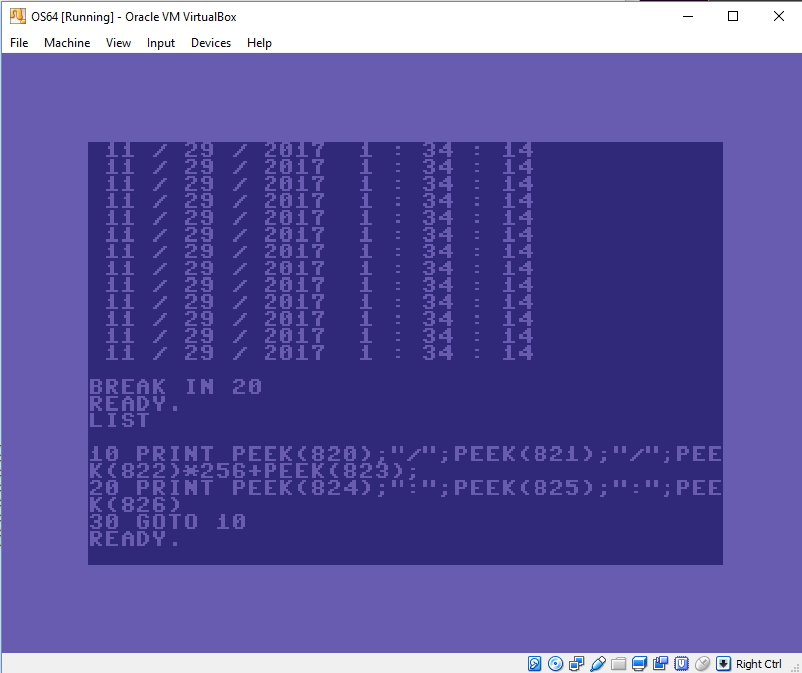
Just something minor, but it continues to demonstrate how we can incorporate modern hardware into the emulated system. In this case, Ive added a real time clock driver. The time values are located in RAM locations:
820 - Month
821 - Day
822 - Year (hibyte)
823 - Year (lobyte)
824 - Hour
825 - Minute
825 - Seconds
Right now, it is polling...which I dont care for because of possible performance issues, but it can optimized later, maybe using interrupts. Also, these values are located in unused RAM location...locations that some programs may want to use. So I will aim to BCD these to the CIA real time clock or some other ROM location.
Here's a few screen shots:
Monday, November 27, 2017
VGA terminal (debugger) screen returns, and faster reset
This weekend, after losing the VGA text mode due to the new screen resolution, I needed to put it back in so that I could do more debugging. So, it's been added back in (ESC key). Also a fast reset (F10) has been implemented.
Next I will be working on timing and some optimizations. On an older Pentium 4 machine, its rather slow at reading the keyboard due to the display resolution. Then I can get back to some of the integration features (harddisk drives 9-11, partitions, USB, networking, etc). Ive also been trading some improvements with the original emulation author. Great guy to work with.
I was able to get a pretty cool game running with all the VIC-II fixes put in. Its a pacman clone. Here's some pics:
Next I will be working on timing and some optimizations. On an older Pentium 4 machine, its rather slow at reading the keyboard due to the display resolution. Then I can get back to some of the integration features (harddisk drives 9-11, partitions, USB, networking, etc). Ive also been trading some improvements with the original emulation author. Great guy to work with.
I was able to get a pretty cool game running with all the VIC-II fixes put in. Its a pacman clone. Here's some pics:
Friday, November 24, 2017
16 bit color!
So due to the previous issue, I decided to go full-on VESA modes (in this case, 800x600) via GRUB2, including 16 bit color. The net effect is that the resolution should work on most VESA compliant machines, and the colors should look much more like the original C64. Here's a screenshot:
Tweaking the optimizations and skipframes needs to be worked out a little. On older machines, ive been able to out-type the system. Will keep working on this to improve timing. Cycle-exact would be ideal, but not there just yet.
I've compiled this for 640x480x16, 800x600x16, and 1024x768x16 and it scales fine. I picked 800x600 because it gives a reasonable performance and render. Those of you who are looking at the source, the loader.s file contains the requested resolution. Multiboot is supposed to try to give the requested resolution or provide a near option, but Id say most support 800x600.
Again, this means that the old text mode (ESC key) isnt available at the moment. The purpose of that screen was to aid in debugging, so I will probably go ahead and generate it again so I can use it and also have access to an ML monitor and disk functions.
Tweaking the optimizations and skipframes needs to be worked out a little. On older machines, ive been able to out-type the system. Will keep working on this to improve timing. Cycle-exact would be ideal, but not there just yet.
I've compiled this for 640x480x16, 800x600x16, and 1024x768x16 and it scales fine. I picked 800x600 because it gives a reasonable performance and render. Those of you who are looking at the source, the loader.s file contains the requested resolution. Multiboot is supposed to try to give the requested resolution or provide a near option, but Id say most support 800x600.
Again, this means that the old text mode (ESC key) isnt available at the moment. The purpose of that screen was to aid in debugging, so I will probably go ahead and generate it again so I can use it and also have access to an ML monitor and disk functions.
Thursday, November 23, 2017
Widescreen issue
Seems the last build might cause some problems for people with widescreen machines such as below:
First, my apologies. Should have been tested first :)
Im working on a fix and will have something soon.
Also - Happy Thanksgiving! (for those in the USA)
First, my apologies. Should have been tested first :)
Im working on a fix and will have something soon.
Also - Happy Thanksgiving! (for those in the USA)
Lots of VIC-II fixes
So the current build has some improvements in the VIC-II emulation core. Notably:
- Smooth pixel scrolling in the x & y directions
- 24 line mode
- 38 column mode
- Double width and double height sprites
- 800x600 resolution via multiboot
- VIC-II border
- Extended background color mode
These fixes have also been passed along to the original author on his repo (https://github.com/marioballano/emudore). Great guy and I really appreciate his work and support.
Here's a double height/width sprite, and a split screen raster test:
I havent yet done many tests on multicolor or bitmap modes... bouncing around from thing to thing. I have so many test programs right now though, that I need to get back to the DOS commands (making/changing subdirectories, deleting files, renaming, etc). I just bounce around from task to task.
Subscribe to:
Posts (Atom)